February 27, 2008

On March 4th, Life On The Network Will Be Better For Everyone

image

On March 4th, Cisco will hold an interactive online event, where Cisco will unveil an important new innovation. The event features Cisco chairman and CEO John Chambers and other leading Cisco executives, who will share an exciting new solution for enterprise and service provider companies. It will feature live, moderated chat and will be available in multiple time zones so that you can participate from your location. As a network über-user [1], you won't want to miss it.

[1] - What is in an über-user?
One who uses the human network to perform ultra-interactive feats (in real and virtual worlds) anytime, anywhere using any device.

For more info go to www.cisco.com/uberusers

February 24, 2008

The Italian Man Who Went to Malta

It's a bit older but those of you who haven't heard it yet, here you go: http://www.jozjan.net/x/italian_english.mp3

Do we really need to know this binary thing?

During the last two weeks I was teaching a basic networking course (CCNA Exploration 1) for the T-Systems Slovakia and when we have got into the binary numbers, students were a bit confused why do they have to learn all those binary things. To clear out the importance of the binary system I used a picture of a fancy T-Shirt at thinkgeek.com, which is a pretty good example explaining why is it better to use the binary system instead of the decimal system while counting on your fingers. While using a decimal system you can count on your 10 fingers only to 10 (ten). But when utilizing the binary system, you can count on your 10 fingers to 1023 (10^2-1) ;-)

Although to be honest, it could be really a bit confusing (if not dangerous) asking for 4 beers showing it with your fingers in the binary system ...

image

Wikipedia article about Binary Fingers.

Packet Tracer 5.0 - New Features

As Cisco has published an official announcement for the Packet Tracer 5.0, I think, now it should be OK to republish my previous post about PT5.0:

By the request from Cisco, I am temporarily retracting this blog post.

clip_image001

I have been selected as a beta tester for the new Cisco Packet Tracer 5.0 for the Cisco Networking Academy. During the last week we had a Meetingplace conf call with the PT project manager where he showed in his presentation some of the new features. Conclusion? WOW! The Packet Tracer 5.0 will bring many new brilliant features. Just to mention some of them:

WOW feature #1:

PT5.0 will be multi-user. It means you will be able to run multiple instances of PT5.0 on one or more computers and then connect them together trough IP sockets. With this feature you will be able to create one big topology, distributed across computers on your classroom and each student will work on his small part of the big picture. It can lead to network games, challenge labs, etc. Great job guys!

image

WOW feature #2:

Native PT5.0 Linux release! Finally Linux users will be able to use the PT. Although they were already able to run it with Wine.

WOW feature #3:

Open Devel API – PT5.0 will offer an open development API for Flash Action Script and C++. You will be able to write your own PT addons, features, etc. One of the great addon could be a plugin which connects the virtual PT5.0 devices to a real devices!

WOW feature #4:

PT portal – There will be a PT web portal which will collect information about PT, labs for PT, manuals, applications, plugins (addons), etc. It will be available at http://pt.netacad.net

And at last, but not least, some new protocol support:

  • IPv6
  • Multi-Area OSPF
  • Route Redistribution
  • Multilayer Switch (3560)
  • SSH
  • RSTP
  • Frame Relay update
  • Interface range
  • Different grades for different commands in labs
  • Possibility for locking PT to the student's name

A release for the beta testers will be released probably on 28th of February 2008, and a final public release is planed for the beginning of this summer.

.htaccess - Authentication from File and LDAP or other sources at the same time

Sometimes you may need to authenticate a user against different credentials stores, like standard files (.htpasswd), databases, ldap, ...
With Apache, you can use these more authentication sources by defining them in the AuthBasicProvider property.

The configuration bellow will authenticate a user first against a file (.htpasswd) and then against an LDAP accounts.

AuthName 'Enter your Username and Password:'
AuthType Basic

# Authenticate against file and then against ldap
AuthBasicProvider file ldap

# auth file
AuthUserFile /var/www/.htpasswd

# LDAP auth fallback to other auth mechanisms
AuthzLDAPAuthoritative off
AuthLDAPURL ldap://10.0.0.1:6361/ou=web,dc=top?cn?sub?(objectClass=*)

# File auth
Require valid-user
# LDAP auth
Require ldap-attribute objectClass=simpleSecurityObject

You can use it in your Apache's configuration and in the .htaccess as well.

.htaccess - Redirect to SSL (HTTPS) before Basic Authentication

I prefer running a site in HTTP only mode when there are no confidential information transferred (username, password, credit card number, etc.). It saves some of the CPU time because there is no need to do data encryption. But I strongly recommend to use HTTPS mode for confidential information exchange between a web browser and a web server.

I was facing a situation where I had to authenticate a user on a Apache web server, which provided HTTP as well as HTTPS connection. By default a web application running on that server was accessed only by HTTP. I had no access to the Apache's configuration (no root access), what would not be a problem, if I wanted to do just a .htaccess and a .htpasswd based basic HTTP authentication without anything else. It's pretty easy then. Just create a .htaccess file, with contents like this:

AuthName 'Enter your Username and Password:'
AuthType Basic
AuthUserFile /var/www/myweb/.htpasswd
Require valid-user

and a .htpasswd file (man htpasswd) which will contain usernames and particular passwords.

Then put the .htaccess file into a directory which you want to be protected by username/password.

You can even customize it by adding a FileMatch property to require credentials validation only when accessing some files:

AuthName 'Enter your Username and Password:'
AuthType Basic
AuthUserFile /var/www/myweb/.htpasswd
Require valid-user
<FilesMatch "(attach|edit|manage|rename|save|upload|mail|logon|.*auth).*">
      Require valid-user
</FilesMatch>

As I said above, I preffer HTTPS connection when confidential information are transfered over an IP network (in this case username and password). So the thing I wanted to do, was first to redirect a web browser to the HTTPS site and just then request the credentials. This was a point where I've got into a botleneck. If an authentication procedure is defined for a directory or a file, the authentication has higher priority then a redir command (mod_rewrite - redir). So the user is first authenticated, then moved to the HTTPS site and then authenticated once again. The problem is that the first athetincation is transferred in HTTP cleartext which is definitelly not secure.

AuthName 'Enter your Username and Password:'
AuthType Basic
AuthUserFile /var/www/myweb/.htpasswd
Require valid-user
<FilesMatch "(attach|edit|manage|rename|save|upload|mail|logon|.*auth).*">
      RewriteEngine on
      RewriteCond %{HTTPS} !=on    # If the connection is not HTTPS then apply the next Rewrite rule
      RewriteRule .* https://%{HTTP_HOST}%{REQUEST_URI}  [R,L]
      Require valid-user
</FilesMatch>

After some hours spent with configuration and RTFM, I found a hack which is maybe not the ideal solution, but it's pretty good and it's working.

There is an Apache configuration command which can be used in .htaccess as well. If the "SSLRequireSSL" command is specified for a directory or a file and it's accessed with a connection which is not SSL secured (HTTPS), it will generate a 403 error code and an error message will be sent to a web broswer. The "SSLRequireSSL" command has higher priority then the authentication itself, so it will generate this error code always when the connection is not SSL secured.
So far it looks good, the problem is that a user will just see an error page and he is still not automatically redirected to the HTTPS connection. A workaround is a bit tricky. You can define your own custom error documents, which are displayed when an error code is thrown. You have definitely seen these fancy custom error documents for the 404 - Page Not Found error code.

So the workaround was to use the ErrorDocument property in the .htaccess file. A custom page defined in ErrorDocument is called when the error code is thrown. The page itself gets information about the original request, so you can write a custom error page in some server side scripting language and generate some "special" events. I created a perl cgi script (there was no PHP support for that site) which redirects a browser to the HTTPS site which is exactly what I wanted in the beginning. So here is the .htaccess file:

AuthName 'Enter your Username and Password:'
AuthType Basic
AuthUserFile /var/www/myweb/.htpasswd
Require valid-user
<FilesMatch "(attach|edit|manage|rename|save|upload|mail|logon|.*auth).*">
      SSLRequireSSL
      ErrorDocument 403 /bin/move.pl
      Require valid-user
</FilesMatch>

and the move.pl file goes here:

#!/usr/bin/perl -T
use CGI qw(:standard);

$path = "https://$ENV{'SERVER_NAME'}$ENV{'REQUEST_URI'}";
if ( $ENV{'SERVER_PORT'} == 80) {
    print "Status: 302 Moved\n";
    print "Location: $path\n\n";
}
else {
    print "Content-type: text/html\n\n";
    print "How did you get here???";
}

With this combination, if the files defined in the FilesMatch directive are accessed with the HTTP only connection, an 403 error code is thrown by the SSLRequireSSL, which is handled by the ErrorDocument property. The /bin/move.pl cgi perl script is called which will then redirect a web browser to the HTTPS site. Furthermore, if the files defined in the FilesMatch directive are accessed with the HTTPS connection, a user is requested to authenticate himself with his username/password.

It's maybe not the best solution, but it's working, and it's enough to have .htaccess definitions enabled.

Enjoy!

January 28, 2008

L4 based Load Balancing @ Software based routers

With IOS version 12.4.11T you can finally utilize not just the per destination (or per packet) based CEF load balancing, but also L4 port based load balancing!

So far you were able to use this feature only at high end switches like Cisco 4500 and Cisco 6500. Now the 12.4.11T brings this feature to standard software based routers as well. Officially (Cisco Doc) Cisco 800, 1700, 1800, 2600, 2800, 3200, 3600, 3700, 3800, 7200, 7301, AS5000, 7200 7301 series Routers, MWR, MWAM series routers are supported.

More.

Voice and Unified Communications - Training Webcasts

Some very good webcasts about voice and unified communications can be found at http://www.cisco.com/web/learning/le31/le46/products/products-voice-ip-communications.html

I definitely recommend to see at least the TAC trainings. They are really excellent!

btw: You may need a CCO account to access some stuff from that page, but it's enough to have the guest level CCO.

image

January 27, 2008

Web 2.0 - Yet another .com bubble?

Blogging, ajax, facebook, wikipedia, social networking, youtube, myspace, secondlife, rss, voip, podcasts, mashups, and other buzzwords of the Web 2.0 age. But is the Web 2.0 really a new age or is it just a next .com bubble? I guess it all has started about 5 years ago. First with blogs, then continuing with social networking sites where ppl meet ppl (unfortunately only virtually), web developers massively developing Ajax based web applications (putting more of the application logic to the client side), web frameworks have been created, open wiki as a content creating and editing tool, youtube which has became part of our daily life (life where being here means being there), and at the end, Web Operating Systems (or your living spaces?) running in your favorite web browsers.

I think the Web 2.0 is not just a bubble. And even if it is, it has already changed our life, our way of meeting and knowing ppl. It has changed and still changing our way of living.

And what's the recipe of success?  Looks like it's enough to be a student at some fancy university, have an innovative idea, launch it in a web 2.0 interface, make it popular and then sell 1.6% share of your company for at least $240 million. It's so easy to became successful :-)

January 17, 2008

M$ always brings a smile to your face ...

... if not by creating a stable operating system (well, I have to admit that XP and 2k3 are pretty good), then by creating a funny ad. I was browsing around some news sites and found a nice post about a new Microsoft book. This new book was designed for children and their parents to explain and understand why it is not a shame to have a server at your home (Who is the PR manager at M$?). Well, I "think" it's really a matter of life to explain to kids that a home server is nothing wrong, it doesn't make you nerdy and the other kids are making fun of them just because they are jealous and they want to have a home server too. Really, a book about a computer security would be much better and more useful than this :-/ http://tinyurl.com/2yq5u3

January 11, 2008

Xen 3.1 @ Debian 4.0 - VNC domain console does not work

image

I have installed Xen 3.1 binaries on a Debian 4.0 R2 based server. The server is Intel VT enabled so I was just waiting to see Windows running in Xen. Unfortunately even with a good looking configuration I was not able to connect to a VNC console. After some troubleshooting I found a missing library reference error message in logs:

xeon2:/home# tail -1 /var/log/xen/xend-debug.log
/usr/lib/xen/bin/qemu-dm: error while loading shared libraries: libSDL-1.2.so.0: cannot open shared object file: No such file or directory

After installing the SDL package (apt-get install libsdl1.2debian) the VNC console has finally started to work and I was able to install my first Windows@Xen :-D

image

January 6, 2008

Putty feature - Putty authentication agent

Using RSA/DSA key pairs (public and private key) for SSH connection authentication has many advantages. It makes the authentication process more secure (especially when someone can see what are you typing on your keyboard), it enables using automated scripts for backup, etc. Under Windows you can generate RSA/DSA key pairs for ssh connection with the PuTTYgen application.

If you already have your RSA/DSA key pair generated, you copy-pasted the public key to the server to ~/.ssh/authorized_keys, then you can use the private key as an authentication mechanism instead of a password. If you have generated your RSA/DSA keys with a passphrase (I recommend to generate it with passphrase enabled) then you will be requested to enter it while authenticating.

image

image

Sometimes you have to connect to more servers at once, and have to enter the passphrase or a password as many times as many ssh session are you creating. To overcome the need of entering the passphrase, you can use the Putty authentication agent.

Start pageant.exe. A new Pageant icon will be added to the system tray:

image

Doubleclick on the Pageant icon and a window similar to the following figure should be displayed:

image 

The Pageant window contains a list of enabled RSA/DSA keys which are automatically provided to putty or scp applications for RSA/DSA keys based authentication of the SSH session.

Click on Add Key and search for your private RSA/DSA key which you are using for SSH. If you are using a passphrase in your private RSA/DSA key (I highly recommend to use it) then just enter the password and the private key will be added to your enabled keys list.

image

image

That's all. Now if you try to connect to your ssh enabled host, your ssh connection authentication may look like this:

image

and a scp file copy may look like this:

image

!!!BEWARE!!!

Do not forget to lock your computer screen when you are leaving it and you have RSA/DSA keys enabled in Pageant! Otherwise anyone who has physical access to your computer can connect to your servers with ssh without having to know your passphrase.

January 5, 2008

My favorite Windows applications

What are your favorite Windows applications?

January 4, 2008

Print multiple labels per page and use an external data source

Today was somehow a special day. The reason why was it special was an inventory check at CNL. This is always a special event because we usually find on the inventory list some things which we have never seen or even heard about :-)

Anyway, on this year we wanted to put some new labels on your equipment so in the future they could be identified more easily. We bought some A4 pages, each page with 40 stickers. The idea was to print to these stickers with some labels (ID numbers) which will then identify our equipment.

The first problem was finding a software which could be easily used to create these stickers. At the end, the Microsoft Publisher 2007 was used. It's a pretty good piece of software, which can be used to create good looking presentation materials, papers, business cards, labels, etc.

So I started Publisher, created a new project based on some label template. First I changed the size of a label. We had 40 stickers on A4 paper, 10 rows and 4 columns. So one sticker has 5,25cm per 2,97cm size. The I adder our logo figure, some informational text and as last but not least the ID number. Our department uses 8 digits (ID) to identify any equipment and it looked to be a good idea to follow this rule and create these stickers with 8 digits identification code. The year of the equipment acquisition is also important for us, so it has to be visible on a sticker too. So far so simple.

What we needed be then was a dynamic data source with IDs, years of acquisition and other information. This data source was an Excel sheet.

I found on the Microsoft Office web site a great step-by-step guide which describers how to create different labels on the same sheet. Exactly what we needed :-) It's enough just to follow up that guide (the automated method section) and you will be able to create nice labels and stickers with text based on a data source found in XLS file, SQL database, TXT file, or any other Office compatible data source.

image

January 1, 2008

When are you going to sleep?

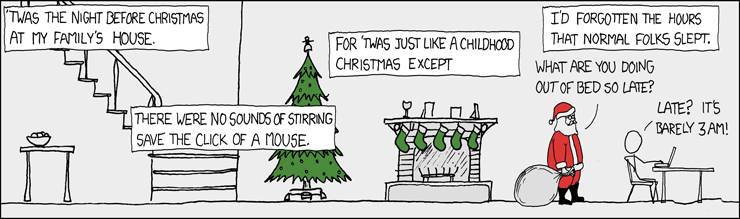
I am usually going to sleep very late. While I was in Finland I got used to go to bed at 4:00AM or 5:00AM. Now when I am back at home, I am trying to be in my bed before 2:00AM and usually I am going to sleep at about 1:00AM. How about you? xkcd

Be there as a hologram

WOW! Nice job guys! More